
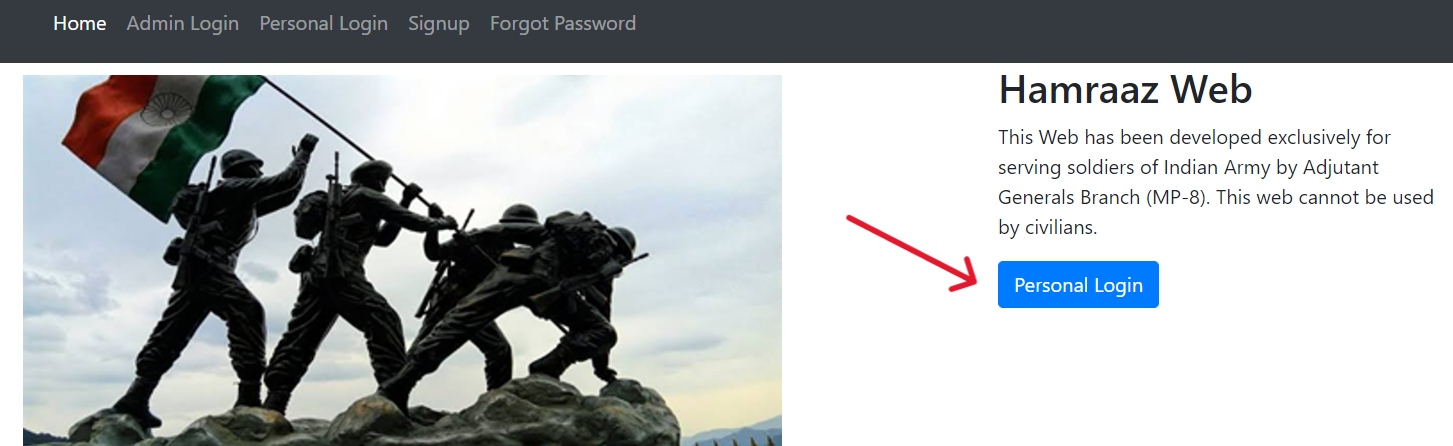
Introduction
For serving Indian Army personnel, the Hamraaz login portal is the most reliable and secure way to access payslips, Form 16, Part II Orders, grievance redressal status, and service-related updates. This comprehensive guide walks you through how to register, log in, view your payslip, reset passwords, and troubleshoot common issues—all while highlighting key safety practices to avoid phishing or fake platforms.
What Is Hamraaz?
Hamraaz is an online self-service portal designed specifically for active Indian Army personnel. It allows:
-
Downloading monthly payslips and Form 16
-
Viewing Part II Orders
-
Submitting and tracking grievances
-
Accessing service records and official notifications
-
Providing secure access for Units and Records Offices (ROs)
The portal ensures confidentiality, ease of access, and timely updates to your pay and service details.
Why Security Matters
When dealing with sensitive military and financial data, safety is paramount. Be vigilant of:
-
Fake or fraudulent websites/apps posing as Hamraaz
-
Illicit apps requesting personal credentials or PAN/Aadhaar before authentication
-
Impersonators pushing downloads from unknown sources
Always prioritize using the official Hamraaz login portal and trusted communication from Records Offices.
Hamraaz: Registration (Signup) Process for Personal Login
Step-by-Step Signup
-
Obtain your PAN card—a valid PAN is essential to register yourself.
-
Navigate to the Personal Login area and choose “New User Signup”.
-
Enter your PAN details, service number, date of birth, and other required fields.
-
Set a strong password—use a combination of upper/lowercase letters, numbers, and special characters.
-
You may receive a one-time password (OTP) on your registered mobile number to complete verification.
-
Confirm your identity and complete the signup process.
-
You can then access the login portal securely using your service number and password.
Best Practices During Signup
-
Double-check that you are on the official government domain before submitting any info
-
Never use passwords you’ve used elsewhere
-
Store your credentials securely, preferably using a password manager
Logging In: Personal Login Process
After completing signup, the Hamraaz login flow is straightforward:
-
Visit the Personal Login page, and enter your Service Number and Password.
-
Complete any additional OTP or two-factor authentication if enabled.
-
Gain access to your dashboard, where your payslip, Form 16, Orders, and other service-specific tools are available.
Tips for Smooth Login
-
Always check for the padlock icon and valid domain in your browser’s address bar
-
Bookmark the official login page to avoid accidental clicks on phishing sites
-
Avoid logging in from public or shared computers
Downloading Payslips and Form 16
Once logged in:
-
Go to the Payslip or Form 16 section
-
Select the month or financial year you need
-
Click Download, and save the PDF securely
-
Ensure your device has the latest PDF reader and antivirus software installed
Keep a local backup of your documents—especially during financial year-end tax filings or service transitions.
Resetting Forgotten Passwords (Forgot Password)
If your password is forgotten or compromised:
-
Click Forgot Password on the login page
-
You may need to submit Service Number, PAN, and date of birth for verification
-
Check your registered mobile number or email for an OTP
-
Enter the OTP and set a new, secure password
-
Log in again immediately and update your settings as needed
Always update your password periodically—even if no issue arises—to maintain security hygiene.
Additional Access: RO and Unit Login
Roles such as Records Office (RO) and Unit administrators have separate login portals.
RO Login and Unit Login modules allow authorized staff to manage:
-
Grievances submitted by personnel
-
Service orders and updates
-
Administrative oversight of payslips and documentation
These modules have stricter access controls and require credentials assigned by Defence HQ or Directorate of Finance.
Safety Precautions & Phishing Awareness
To stay safe:
-
Use only the official Hamraaz portal; never download apps from unknown sources
-
Stay vigilant if any site or app requests PAN before authentication
-
Check your Records Office bulletins for official updates and notifications
-
Enable two-factor authentication (2FA) if your access level supports it
-
Report any suspicious activity to your unit or RO immediately
Summary Table: Hamraaz Login Overview
| Feature | Description |
|---|---|
| Signup | Requires PAN, service number, DOB; secure password setup |
| Personal Login | Service Number + Password (OTP if enabled); access to payslips, Form 16, Orders |
| Payslip & Form 16 | Accessible PDF download by selecting month/financial year |
| Forgot Password | Verification via PAN + OTP; reset password |
| RO/Unit Login | Separate secure portal for administrative staff |
| Security Best Practices | Verify domain, use strong passwords, avoid apps from unknown sources |
1. Who is eligible to use Hamraaz login?
Only serving Indian Army personnel are eligible for Personal Login. RO and Unit logins are for authorised administrative staff.
2. Why is my PAN required during signup?
PAN uniquely verifies your identity and links your personnel record securely to the system. It helps prevent impersonation.
3. What happens if I enter the wrong password multiple times?
Multiple authentication failures may trigger temporary account lock or further verification steps—contact your Records Office if locked out for assistance.
4. Can I access Hamraaz from a mobile phone?
Yes—but only via the official website using a mobile browser. Avoid downloading any unofficial mobile app, which could be harmful or fraudulent.
5. How often is the payslip updated?
Payslips are generated monthly, typically at the start of the next month following salary disbursal.
6. What should I do if the portal shows a technical error?
Try refreshing the page or clearing your browser cache. If issues persist, escalate the issue to your Unit or RO IT support team.
7. Is my data secure on the Hamraaz portal?
Yes—the portal runs on a secure government-maintained domain with encryption and strict access controls to protect your details.